
DE EN FR ES IT
Schiriuhr App Icon

Schiriuhr

The professional timer app for referees

The Story

As a referee, I wanted more than what a typical Casio watch could offer.

My goal was to start and stop the timer while tracking goals for both teams – all without taking my eyes off the field. A simple watch wasn't enough – I needed a solution specifically designed for a referee's needs.

The result is Schiriuhr – an app that does exactly what I need on the field.
Features

Important Note

Continuous timer, Always-On Display, and haptic feedback place real load on your Apple Watch's battery. Make sure it's fully charged before kickoff – a low battery can cause the app to shut down mid-match.

Precise Timing

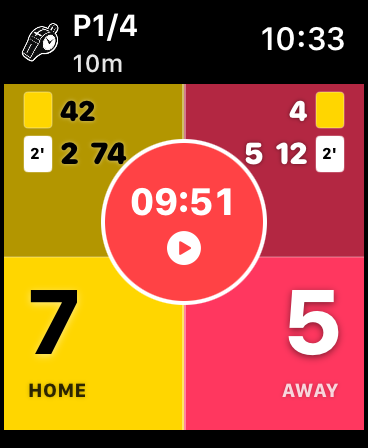
High-precision timer for game time and periods – counts up during play, counts down during breaks. Accurate to the second – keep your eyes on the field, not the watch.

Apple Watch screen showing a running timer at 09:51 in period P1/4, score 7:5, with active penalty indicators for both teams

Score Tracking

Tap once on a team's segment to record a goal (+1). Double-tap or long-press to instantly undo the last entry. Clear display on the Watch screen.

Period Management

Period indicator (P1/4 / PB / P2/4) always visible. When the first period ends, a PB button appears – tap once for the period break, tap again to start the next period.

Built for Any Sport

Designed with Handball in mind – but flexible enough for any sport. Period durations and break times are freely adjustable, so you can use Schiriuhr for Ice Hockey, Water Polo, or whatever you referee.

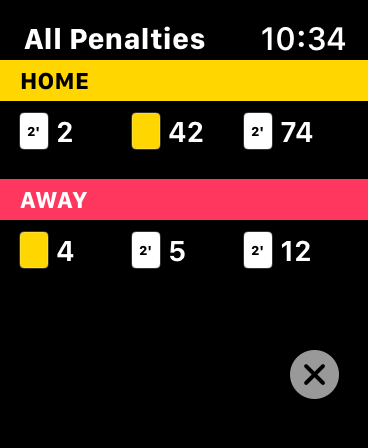
Penalty Card Tracking

Record Yellow Cards, 2-Minute Penalties, Red Cards and Red+Blue Cards directly on your Apple Watch. The card panel is always visible in the game screen – enter player number, pick card type, all timestamped. Yellow cards are capped at 3 per team.

All Penalties overview on Apple Watch showing active penalties for both the home and away team

Digital Crown Time Adjustment

Pause the timer and rotate the Digital Crown to adjust remaining game time on the fly. Perfect for stoppage time and referee decisions.

Always-On Display

The watch face stays active and readable throughout the entire match – no wrist raise needed to check the current score and time.

Game Summary

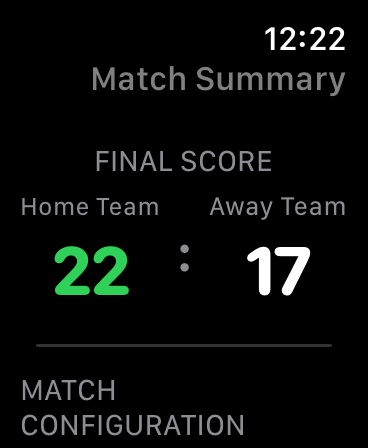
After the final whistle, an automatic summary shows the final score, match configuration and game log (Premium). Resume or return to the main menu.

Match Summary on Apple Watch showing the final score 22:17 between Home Team and Away Team

Resume Match

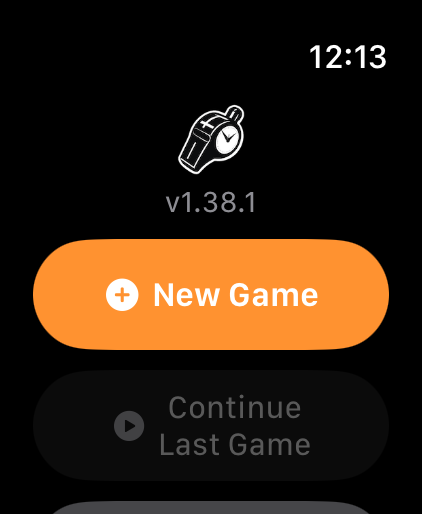
Open Schiriuhr and tap "Continue Last Game" – your last match picks up right where you left off. Nothing is lost when the Watch restarts or the app closes.

App home screen with the “New Game” and “Continue Last Game” options

Haptic Feedback

Feel every interaction with precise haptic feedback – goal confirmations and timer actions – plus a strong triple-pulse buzz 30 seconds before the final whistle.

Watch Face Complications

Launch Schiriuhr straight from your watch face or the Smart Stack via a WidgetKit complication – no need to hunt for the app in your list.

How to Use

Set Up a Game

Before kick-off

  1. Open Schiriuhr → tap "New Game"
  2. Choose half duration (e.g. 30 min for handball) or enter a custom value via the number pad
  3. Set period break duration (e.g. 15 minutes)
  4. Pick team colours for home 🏠 and away ✈️
  5. Tap "Start" – the match begins!
Quick Start: The next time you open the app, your last configuration is shown. Tap "Same Settings" for an instant restart.

During the Match

In action on the pitch

Timer

  • Tap the time → start / pause
  • After 1st period: PB button → start period break
  • During break: ▶ button → start next period

Goals

  • Tap once on team area → +1 goal
  • Double-tap → undo last goal

Time Adjust

  • Pause the timer
  • Rotate Digital Crown → change time

Cards

  • Enter player number – directly in the game screen
  • Select: Yellow / 2-Min / Red / Red+Blue

Suspension Overview

  • Swipe down from the top edge → show all active penalties
  • Swipe right / left → home or away team penalties
End match: Stop the timer → tap the Schiriuhr logo → select "End Match".

After the Match

Summary & review

  1. Automatic game summary with final score
  2. Period duration at a glance
  3. View goal log (Premium) – goals by period
  4. "Resume Match" → return to the timer
  5. "Exit to Menu" → start a new match
Resume later: Even after closing the app, the last match can be continued at any time by tapping "Continue Last Game" on the home screen.

Premium Features

Extend Schiriuhr with optional in-app purchases

Unlock all premium features – one-time €1.99

Goal History

All goals in chronological order by period – with minute and team.

Custom Themes

Pick any team colour using the hue slider.

Technical Specifications

Platform

watchOS 10.6 or later

Devices

Apple Watch Series 4 and newer

Languages

German, English, French, Spanish, Italian

Price

Free, premium features €1.99

Beta

Beta Programme – Android

Be among the first to try Schiriuhr on Android. Just send us a short email and we'll get you access.

Android (Google Play)